Word MindSort: Solitaire
TEEWEE LIMITEDWord
4.5856.00 Reviews
- Version
- 3.802.262
- Installs
- 500.00K
- Age Rating
- Everyone
Screenshots
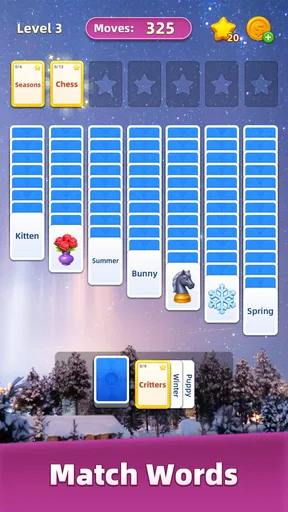
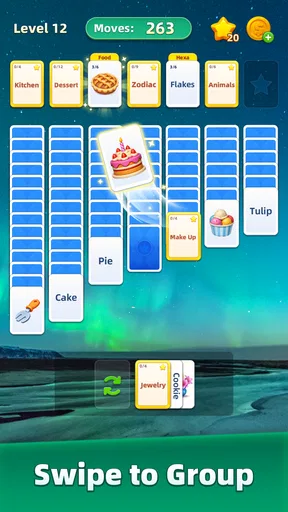
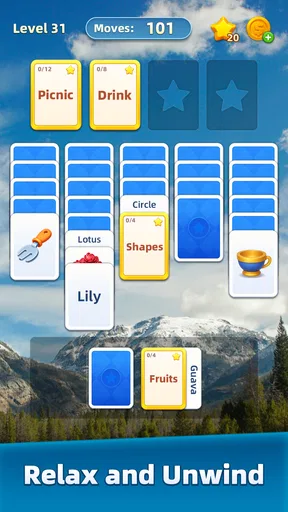
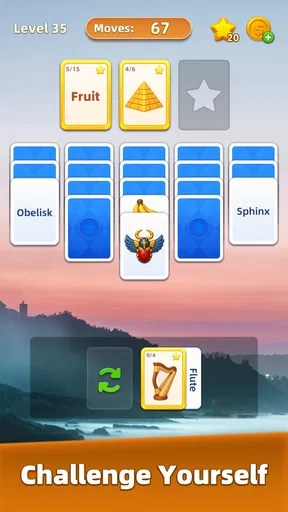
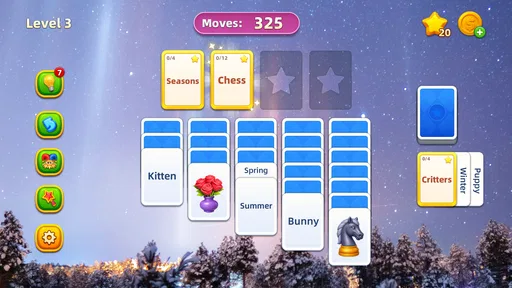
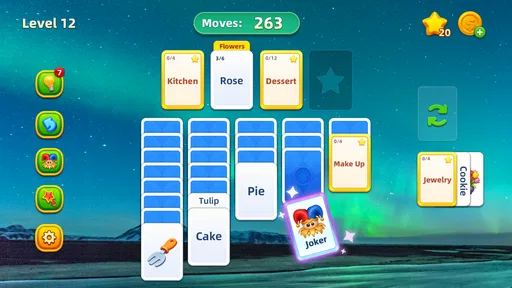
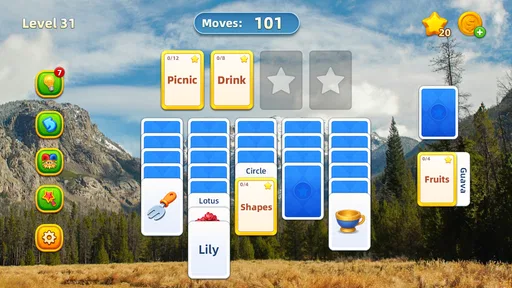
Our Review of Word MindSort: Solitaire
 Analysis by Appyee
I like word games best when they give me a clear little problem to solve without demanding a long stretch of free time. Word MindSort: Solitaire caught my attention because its central idea asks me to think about letters in a more tactical way than a standard word search. The appeal is the combination: I’m looking for words, but I also have to think about the order in which I use what’s available. That makes it a better fit for short, focused sessions than for anyone expecting a sprawling story or a conventional card game.
Small goals make it easy to begin
The opening appeal is straightforward: look at the letters in front of you, find a word, and make a choice about what to play next. I don’t need to learn a complicated setting before I can get started. The solitaire influence gives the word-making a sense of order, so the puzzle is not simply “find every word you can.” The small decisions are the point, and a quick round can feel satisfying even when I only have a few minutes.
That structure suits ordinary gaps in the day. I can imagine opening a puzzle while waiting for a takeaway or during a quiet break, then putting the phone away when I’m called back to something else. It is also a useful option for someone who wants to exercise vocabulary without turning relaxation into homework. The key trade-off is that the game asks for attention: if I’m distracted, I’m more likely to miss a useful word or make a move that leaves me with fewer choices.
Progress feels best when I notice my own decisions
What keeps a word-and-solitaire puzzle engaging is not only completing a board but learning to spot better sequences. I get more from a round when I pause before using an obvious word and check whether another play might open up a stronger choice. That habit is a practical tip for anyone who tends to rush: treat the available letters as a small planning problem, not a race to tap the first word that comes to mind.
The game’s sense of momentum works best when I set a modest personal goal, such as finishing one more puzzle or finding a cleaner route through the letters. That is more satisfying than playing on autopilot just to make progress. A hint can be useful when I’ve genuinely run out of ideas, but I would save it for a moment when I’ve looked over the board carefully. Using help too quickly can take away the chance to recognize a pattern on my own.
Its challenge has a particular pace
This is a calmer kind of difficulty than a timed word scramble. The pressure comes from choosing well within the puzzle’s rules, rather than from having to type as fast as possible. That makes it appealing to players who enjoy thinking a move or two ahead, and less suitable for people who want quick reflex tests or a head-to-head match that keeps changing pace.
There is also a natural limit to this format: once I understand the basic rhythm, the enjoyment depends on whether I still like making these small sequencing decisions. Anyone who mainly wants free-form vocabulary practice may prefer a word search, crossword, or an app that accepts any word they can spot. Here, the solitaire-style constraints are what make the play distinctive, but they can also feel restrictive if I want to explore every possible word without worrying about order.
First Impressions
Right off the bat, the interface of Word MindSort: Solitaire is sleek and user-friendly. The colors are bright yet not overwhelming, and everything is laid out in a way that makes it super easy to navigate. You don’t have to be a tech wizard to find your way around here, which is always a plus in my book. The app is available for both Android and iOS, which means you can enjoy it on pretty much any smartphone or tablet.
Gameplay Mechanics
So, how does it work? Essentially, you’re combining the strategic planning of solitaire with the creative thinking of word puzzles. You’re given a selection of letters and need to arrange them to form words, all while adhering to certain solitaire-like rules. It’s the kind of game that’s easy to pick up but challenging enough to keep you coming back for more.
I found myself getting lost in the puzzles, trying to beat my own scores and unlock new levels. The game gives you a satisfying little dopamine hit every time you complete a challenge, which keeps the momentum going. Plus, there are daily challenges to keep things fresh and exciting.
Features Worth Mentioning
This app is packed with features that enhance the overall experience. For starters, there’s a hint system for when you’re feeling stuck. I can’t tell you how many times I used it when I was banging my head against a particularly tough puzzle. The hints don’t give away the solution outright, which I appreciate—they just nudge you in the right direction.
Another neat feature is the leaderboard. If you’re competitive like me, you’ll love trying to climb the ranks and show off your wordsmith skills. There’s also a calming background music option that you can toggle on or off, which is perfect for those who like to zen out while playing.
Performance and Accessibility
Performance-wise, Word MindSort: Solitaire runs smoothly. I didn’t experience any lags or crashes, even when switching between levels or using the hint function. The app is also optimized for a variety of devices, so whether you’re on a high-end smartphone or something more budget-friendly, it should run just fine.
As for accessibility, the app includes options to adjust font sizes and color contrasts, making it more inclusive for players with different needs. It’s great to see developers taking this into account, as it ensures more people can enjoy the game.
Final Thoughts
After spending some quality time with Word MindSort: Solitaire, I can confidently say it’s a winner. It’s engaging, challenging, and just plain fun. The combination of solitaire and word puzzles is a match made in heaven, offering a unique twist that sets it apart from other games in the genre.
If you’re looking for a game that will both entertain and challenge you, this one’s definitely worth a download. Plus, it’s free to start playing, with in-app purchases available for those who want to enhance their experience further. So, why not give it a shot and see if you can become the ultimate word master?
Who will enjoy this kind of puzzle?
I’d recommend it most to players who already enjoy both card-style planning and word games, but don’t necessarily want either one in its usual form. Someone who likes arranging options before committing to a move may find the blend more absorbing than a simple word search. It can also work for families, since its age rating is Everyone, though the best experience still depends on whether each player enjoys spelling and taking turns through a puzzle rather than competing in a fast action game.
I would steer away from it if your main reason for downloading a word game is to learn vocabulary through definitions, build a personal word list, or solve long-form crosswords. The solitaire framing makes the available choices matter, and that is precisely why some players will enjoy it and others may find it limiting. If you prefer an open-ended word hunt with no sequencing decisions, a conventional word search is the more direct choice.
A practical way to play without wasting hints
When I hit a stubborn board, I’d first scan for short words and then check whether using one would expose or block a more promising option. That simple pause helps me avoid spending a hint on a word I might have noticed after looking at the letters from a different angle. If I’m still stuck, I can use the hint as a nudge rather than treating it as a solution. It keeps the satisfying part—the actual decision—in my hands.
Daily challenges, as described in the game experience, give a returning player a concrete reason to open it again. I’d use them as a small routine rather than a commitment: one puzzle with breakfast, or a quick round during a commute when I’m seated and can focus. I wouldn’t choose it while walking or doing something that needs my attention; reading letters and weighing moves is more demanding than a game that can be played by reflex.
How it fits beside other word games
Compared with a crossword, this feels less like working through clues and more like managing a changing set of options. Compared with a word search, it asks for more deliberate sequencing and less scanning across a fixed grid. Those differences are useful when I want a puzzle that feels strategic without requiring a long session. They also explain why it is not a replacement for every word-game mood: players who want clue-solving, free exploration, or rapid rounds may be happier with another format.
The leaderboard adds a competitive reason to revisit puzzles, but I’d treat it as optional motivation rather than the main attraction. If comparing results makes a relaxing game feel stressful, there is no need to chase ranks; personal improvement is enough. Likewise, the background music option is a small practical choice: I can leave it on for a quiet session or switch it off when I want to play in a shared space without adding sound.
What to know before installing
The game is free to download, and its in-app purchases range from $1.99 to $99.99 per item. I’d start with the free experience and decide whether I actually want anything extra before spending. The game is made by TEEWEE LIMITED, has a 4.5 average from around 12,000 ratings, and has passed 100,000 installs. Its Everyone age rating makes it broadly approachable, while the current version is 1.612.229 and Android support starts at version 5.0.
Those figures provide useful context, but they don’t tell me whether the puzzle style will suit a particular player. My own test would be simple: play enough to see whether I enjoy planning the order of words, not just the moment of finding them. If that decision-making feels satisfying, the daily challenge and leaderboard can give the game some staying power. If it feels like an obstacle between me and making words, I’d move on to a less constrained word puzzle instead.
How its progression holds up
For me, the strongest progression signal is the feeling that I’m making more deliberate choices, rather than merely clearing one board after another. Unlocking levels can give a session a clear next step, while beating my own scores offers a personal measure of improvement. Those goals are easy to understand, but they work best when I enjoy the underlying puzzle; no sequence of unlocks can make a repeated decision pattern feel fresh if I’ve stopped enjoying it.
The overall pace is suited to people who like a steady series of compact challenges. It doesn’t have to turn into a long sitting, and a daily puzzle can create a gentle return habit. I’d avoid treating that routine as an obligation, though. The most enjoyable approach is to stop when I’m no longer weighing moves thoughtfully, then come back when I have the attention for another round.
My progression verdict
Word MindSort is at its best when its goals support the puzzle rather than compete with it: a level to work toward, a score to improve, or a daily challenge to fit into a spare moment. I find that enough structure to encourage repeat play without needing to make the game my main hobby. The limitation is equally clear: players who require a constantly changing mode of play or a strong narrative reason to continue may find this kind of progression too modest.
Overall, I’d give it a try if the idea of combining word recognition with solitaire-like planning sounds appealing. It is a focused, accessible option for short breaks, and the free start makes it easy to judge the core loop for yourself. I would choose a crossword for clues, a word search for relaxed scanning, or a faster puzzle for urgency—but when I want to pause, plan, and make a careful word play, this is the format I’d reach for.
Verdict
Strengths of Word MindSort: Solitaire
- Engaging and challenging puzzles.
- Visually appealing interface.
- Smooth and intuitive controls.
- Regular updates with new levels.
- Offline play available.
Limitations of Word MindSort: Solitaire
- In-app purchases can be pricey.
- Ads may interrupt gameplay.
- Limited hints available per day.
- Requires storage space for updates.
- No multiplayer mode.
Similar Picks in This Category
View All
Word Search - Word Puzzle Game
Bluetile4.8

Word Search Quest - Puzzles
Blackout Lab4.8

CodyCross: Crossword Puzzles
Fanatee, Inc.4.7

Words of Wonders: Crossword
Fugo Games4.9

Wordscapes: Word puzzle game
PeopleFun4.7

Word Search Explorer
PlaySimple Games4.9
Frequently Asked Questions
What is Word MindSort: Solitaire, and how does it differ from traditional solitaire games?
Word MindSort: Solitaire combines the classic solitaire card game with word puzzle elements, offering a unique twist. Instead of simply stacking cards, players must form words from the letters on the cards to progress. This innovative blend challenges both your strategic card skills and vocabulary, setting it apart from traditional solitaire games.
Is Word MindSort: Solitaire suitable for all age groups?
Yes, Word MindSort: Solitaire is designed to be accessible for a wide range of ages. Its intuitive interface and adjustable difficulty levels make it enjoyable for both younger players looking to improve their vocabulary and adults seeking a cerebral challenge. Parents can also use it as an educational tool for kids.
Does Word MindSort: Solitaire require an internet connection to play?
No, Word MindSort: Solitaire can be played offline, making it a perfect companion for travel or situations where internet access is limited. However, certain features, like leaderboards and daily challenges, may require an internet connection to access fully.
Are there in-app purchases in Word MindSort: Solitaire, and are they necessary to enjoy the game?
While Word MindSort: Solitaire offers in-app purchases, they are entirely optional. These purchases typically include cosmetic upgrades or additional hints to assist in challenging levels. The core gameplay experience remains enjoyable and fully accessible without spending money, allowing players to progress through skill and strategy.
How does Word MindSort: Solitaire handle player data and privacy?
Word MindSort: Solitaire is committed to protecting player data and privacy. The app collects minimal data, primarily for enhancing user experience and game performance. All data handling complies with standard privacy regulations, and players can review or manage their data preferences within the app settings.
Play our best games!


